How to Run an AI Inventory for Your Business (Step-by-Step)
AI Act, Compliance
A client asks you about AI compliance and you do not have an answer. Or you read about the EU AI Act and realize you have no idea which AI systems your company actually uses. Sound familiar? That is exactly where everyone starts.
The good news: you do not need a consultancy firm to get a handle on your AI usage. Building an AI inventory takes about 30 minutes. This guide shows you how.
Why you need an AI inventory (and when it becomes mandatory)
The EU AI Act sorts AI systems into risk categories. For high-risk systems, strict obligations apply, including registration in an EU database (Article 49). But even if you do not use high-risk systems, you need an inventory to establish that fact.
Without an overview, you cannot determine which rules apply to you. It is like filing your taxes without knowing what income you have.
Obligations for deployers of high-risk AI become enforceable in August 2026. But waiting for the deadline is risky. Building an inventory costs little time now. Catching up under pressure costs a lot more.
Step 1: Think broader than "AI tools"
When you think of AI, you probably think of ChatGPT or Copilot. That makes sense. But the AI Act uses a broad definition in Article 3. Far more systems fall under it than you expect.
Consider:
- Your CRM scoring leads on purchase likelihood (Salesforce Einstein, HubSpot)
- Your email tool predicting optimal send times (Mailchimp, ActiveCampaign)
- Your HR platform filtering CVs or ranking candidates (Personio, Recruitee)
- Your accounting software flagging anomalies (Exact, Xero)
- Your customer service tool with a chatbot or sentiment analysis
These are not futuristic applications. These are tools you probably already use. And they all fall under the AI system definition in the EU AI Act.
Step 2: Walk through your software stack
Start with what you already have: your list of software subscriptions. Think invoices, SSO logins, or your IT asset overview.
Go through each tool and ask yourself: does this tool have functionality described as "smart," "intelligent," "automated," or "AI-powered"?
Also check your vendors' feature pages and product documentation. Many SaaS providers have added AI features over the past two years without you actively opting in. That automatic upgrade to "AI-powered" means you may suddenly fall under the AI Act as a deployer.
Make a simple list. A spreadsheet works fine. Columns: tool name, vendor, description of the AI functionality. That is all you need at this stage.
Step 3: Ask your team
This is where most companies miss a piece. Shadow AI is real. Employees use tools you did not purchase, did not approve, and may not even know about.
That is not necessarily a problem. It becomes a problem when you do not know about it.
Ask your team a simple question: "What AI tools are you using to get work done?" You can do this in a quick team meeting, a Slack poll, or a shared spreadsheet. Keep it low-barrier. Frame it as helpful, not as surveillance. The goal is a complete list, not a blame game.
Typical surprises: employees using ChatGPT for emails, marketing teams running AI image generators, sales teams using AI transcription tools during client calls. All of those belong on your inventory.
Step 4: Assess each system on three questions
Now that you have a list, run each system through three core questions. These questions map directly to the risk classification logic of the EU AI Act.
1. Does it actually use AI? Not everything labeled "smart" qualifies as AI under the law. A static rule-based filter is not an AI system. A model that learns patterns from data is. Check your vendor's documentation if you are unsure.
2. Does it make or influence decisions about people? Think recruitment, scoring, pricing, access decisions, or credit assessments. If a system affects the opportunities or rights of individuals, the risk profile increases significantly.
3. Does it use biometric data? Facial recognition, voice analysis, fingerprints. If the answer is yes, you are likely in the high-risk category or even dealing with prohibited AI practices.
This is a self-assessment tool, not legal advice. But it gives you a practical starting point for placing each system.
Step 5: Record it in an AI register
An inventory in your head does not count. Write it down. For each AI system, record at minimum:
- Name and vendor of the system
- What the AI does in concrete terms
- Whether it makes automated decisions about people
- Whether human oversight is possible
- The risk profile based on the three questions from step 4
Keep it simple. A shared spreadsheet works. But if you have multiple systems and want to maintain oversight, structure helps.
In ComplianceHive, you record each AI system through a step-by-step wizard. You walk through the AI classification, risk profile, and decision-making impact per system. Everything in one place, audit-ready.
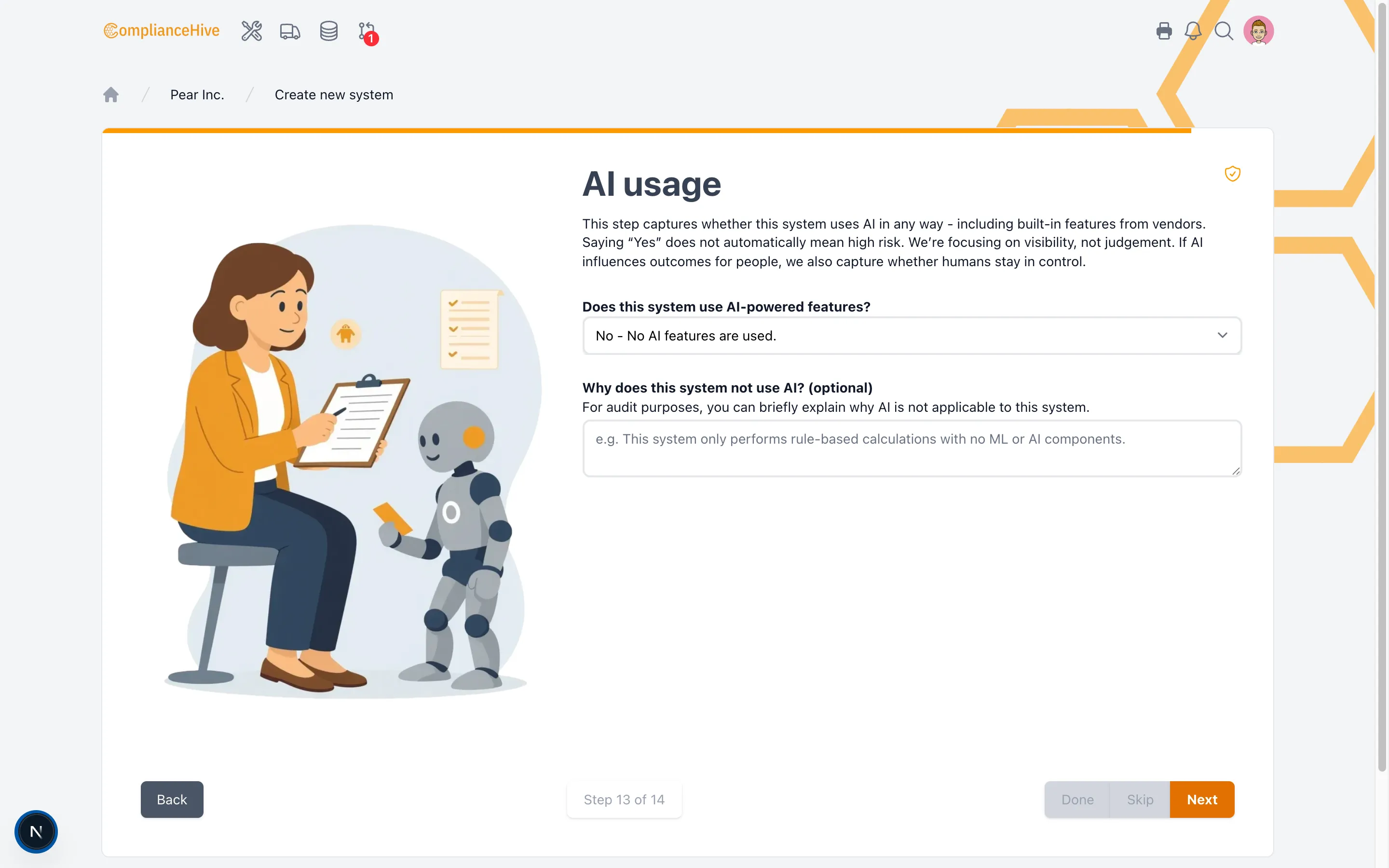 In ComplianceHive you record each AI system through a step-by-step wizard, including AI type, risk class, and automated decision-making.
What next? Determining risk class
You now have a list. That is the foundation. The next step is determining the risk class for each system. The EU AI Act works with four levels: unacceptable risk (prohibited), high risk, limited risk, and minimal risk. Each level comes with different obligations.
In our article on risk classification, you can read exactly how to categorize each system and what that means in practice.
Want to keep everything in a central AI system register? You can start today.
Frequently asked questions
Does every company need an AI inventory under the EU AI Act?
Not every company is legally required to maintain a formal AI register. But if your organization uses high-risk AI systems, such as AI for recruitment or credit scoring, you must register those in the EU database. For all other AI systems, an internal inventory is strongly recommended because without an overview, you cannot determine which obligations apply to you.
What is the difference between an AI inventory and an AI register?
An AI inventory is your internal overview of all AI systems your organization uses. An AI register is the formal registration in the EU database, required for high-risk systems under Article 49 of the AI Act. In practice, everyone starts with an inventory and builds from there.
How long does it take to build an AI inventory?
You can set up a first inventory in about 30 minutes. Walk through your software stack, check your tools' feature pages for AI functionality, and ask your team a quick question about which tools they use. Perfection is not the goal. The goal is that the inventory exists.
What information should be recorded per AI system?
At minimum, record the name of the system, the vendor, what the AI functionality does, whether it makes automated decisions about people, and whether human oversight is possible. For high-risk systems, you also need technical documentation and logging.
What do I do if an employee has been using an AI tool without approval?
Treat it as information, not as a violation. Shadow AI is everywhere. Add the tool to your inventory, assess the risk, and then decide whether the tool can stay (possibly with conditions) or needs to be replaced. The most important thing is that you know about it.
This article is general information and not legal advice. Consult a qualified legal professional for legal interpretation.